Give riders your own branded booking page. They pick their stop, pick their exact seat on a real seat map, and pay for a one-way or round trip in one checkout. QR tickets arrive by email, and drivers scan them on their phone, even with no signal.
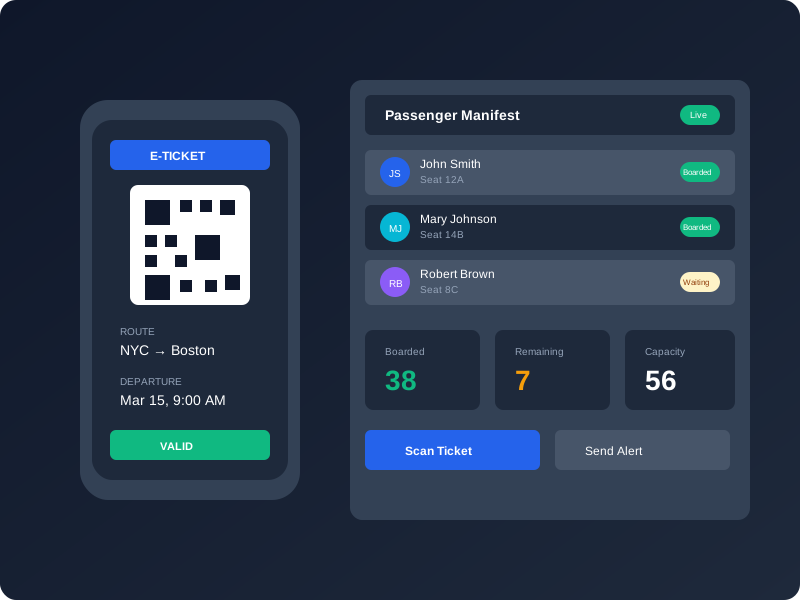
From the first click to the last stop, every seat is tracked in one system.
On your branded booking page, riders choose a stop, a date and their own seat, then pay with a card. Your office can also sell by phone or at the counter.
Each rider gets a signed QR code by email, with a receipt and a ticket page they can open again whenever they need it.
Drivers scan tickets with their own phone. Green means board, amber means check ID, red means stop. It works offline.
As riders board, the manifest shows who is on. Sales, refunds and revenue show up in your reports straight away.
Every operator gets a booking page on their own MotorCoach.ai web address, with their logo, brand color, photos and wording. Point your website's "Book Now" button at it and start selling. Riders don't need an account or an app.
Add your logo, brand color, hero photo, headline, About text, a FAQ, trust badges and your terms. Each route gets a "Where we go" card showing its lowest fare and next departure.
Riders choose where they get on and off. The calendar only offers days that have departures, shows the lowest fare for each day and marks days that are sold out.
Riders choose seats on an actual map of the coach and name each passenger. Wheelchair and staff seats are marked clearly.
Riders book both directions in one checkout. You can offer a discount on the return leg, or sell one-way only.
Fares are shown up front ("Adult from $150"), and the totals include any card fee. Before paying, riders accept your terms and a cancellation policy built from your refund settings.
Choose from 30 amenities, including Wi-Fi, power outlets, restrooms, accessibility and luggage. Set them for the whole fleet or route by route.
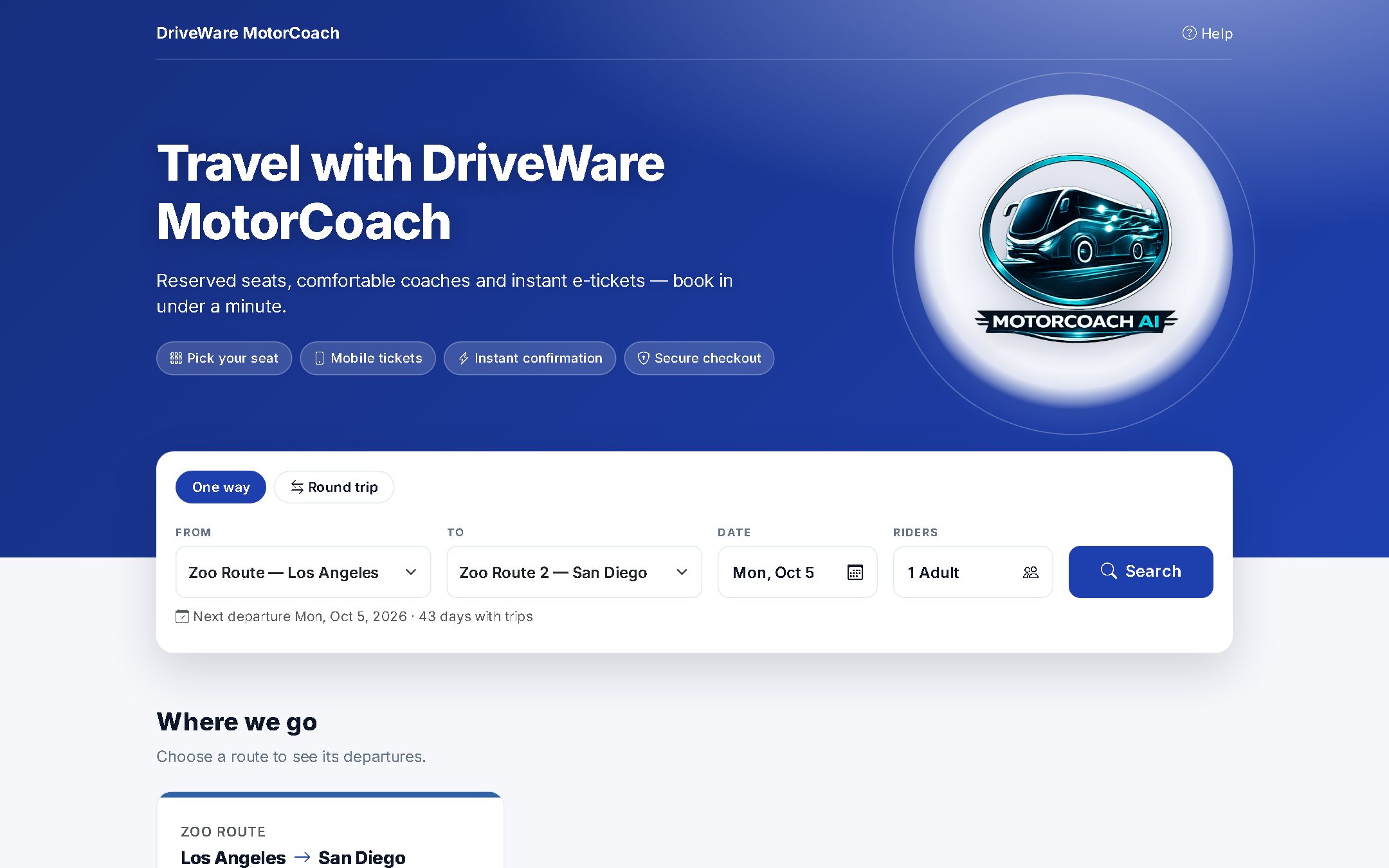
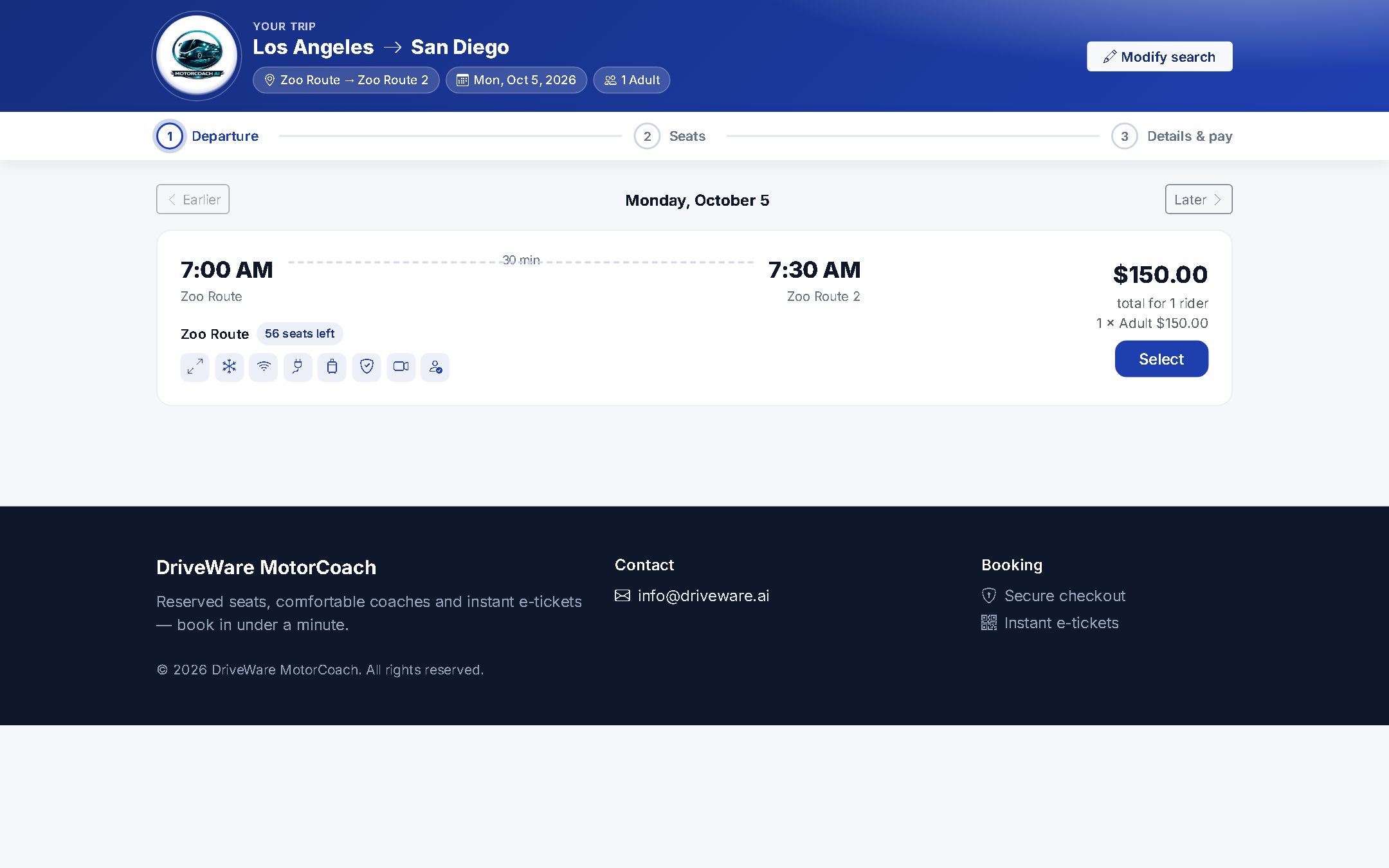
The booking page, then departures with seats left, amenities and the price for the whole party. It is built for phones first. Screens shown are from a demo company.
Online, by phone or at the counter, every sale draws from the same live seat inventory.
The database blocks double-booking itself, so two buyers can never get the same seat, even if they check out at the same moment.
A rider's seats are held while they pay. Holds get shorter when a departure is nearly full, and seats go back on sale as soon as the rider leaves.
See every route for the next week, with seats left color-coded. From any departure, one click opens the sell screen, the manifest or the departure itself.
Choose how many days ahead tickets go on sale, and set a sales cut-off for each route. Riders who come too early see "Tickets go on sale Tue, Oct 6", not an empty page.
Online bookings have a party-size limit (10 riders by default). Larger groups are asked to call, so your office can handle them.
Decide which routes show on your public page. Private and closed departures can still be sold by your office.
Selling seats starts with a seat map of the actual coach. Lay it out once in the seat layout editor, and every seat on it becomes a ticket you can sell online, by phone or at the counter.
Pick a 56-seat coach, a 55-seat coach with a wheelchair bay, a 32-seat minibus or a 15-seat van, then add or remove rows and columns to match your vehicle.
Each cell is a seat, a wheelchair space, a staff seat or an aisle. Staff seats are never sold, and one button renumbers the seats when you're done.
The editor counts your sellable seats as you go, such as "55 seats for sale (1 wheelchair)", so the number on the map is the number you can sell.
On your booking page, riders see the same map, choose the exact seats they want and name each passenger. Each rider pays the fare for their rider type.
A seat is held while the rider pays and comes off the map the moment it is sold, whether the sale was online or in your office.
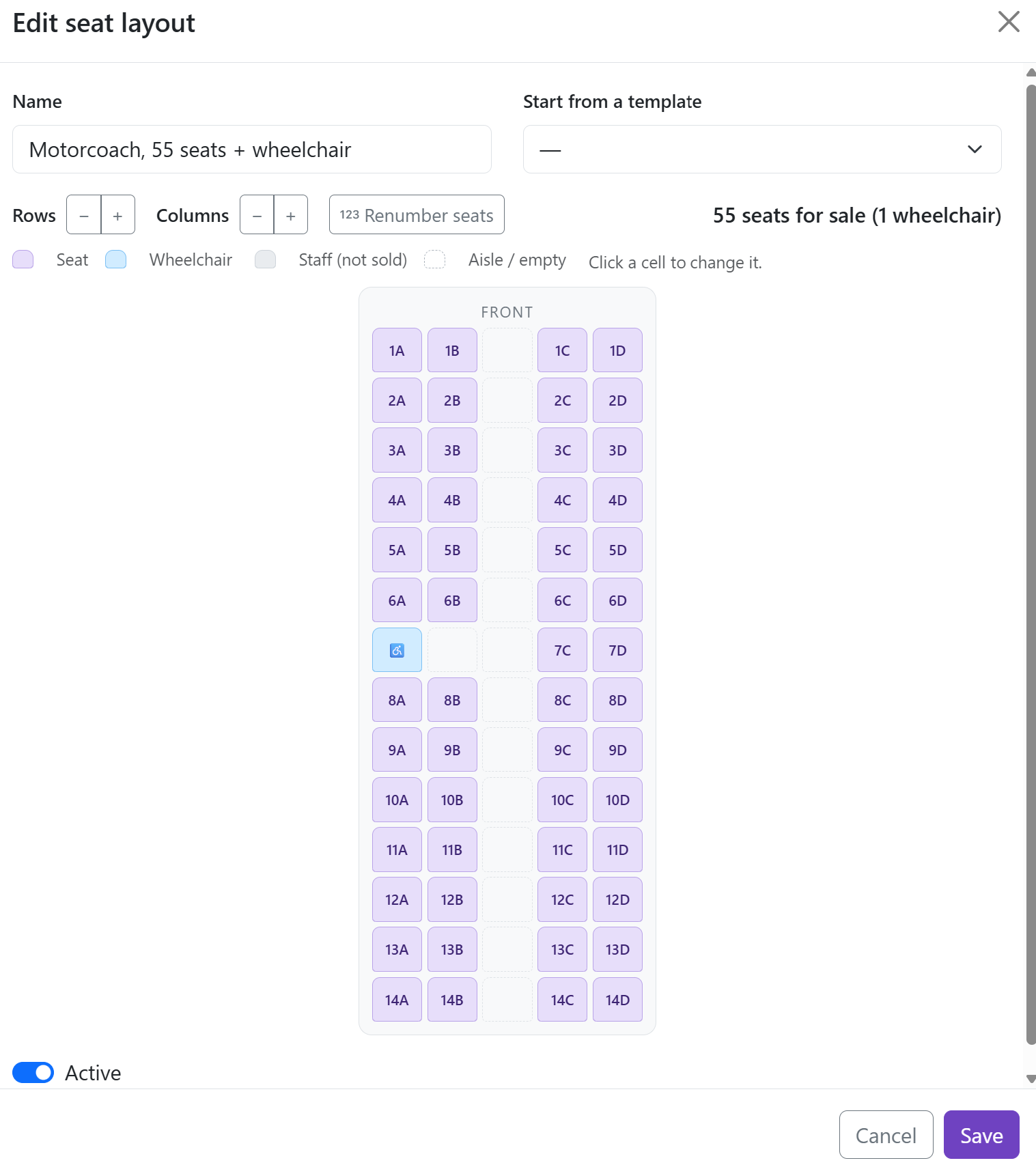
What you build: the seat layout editor.
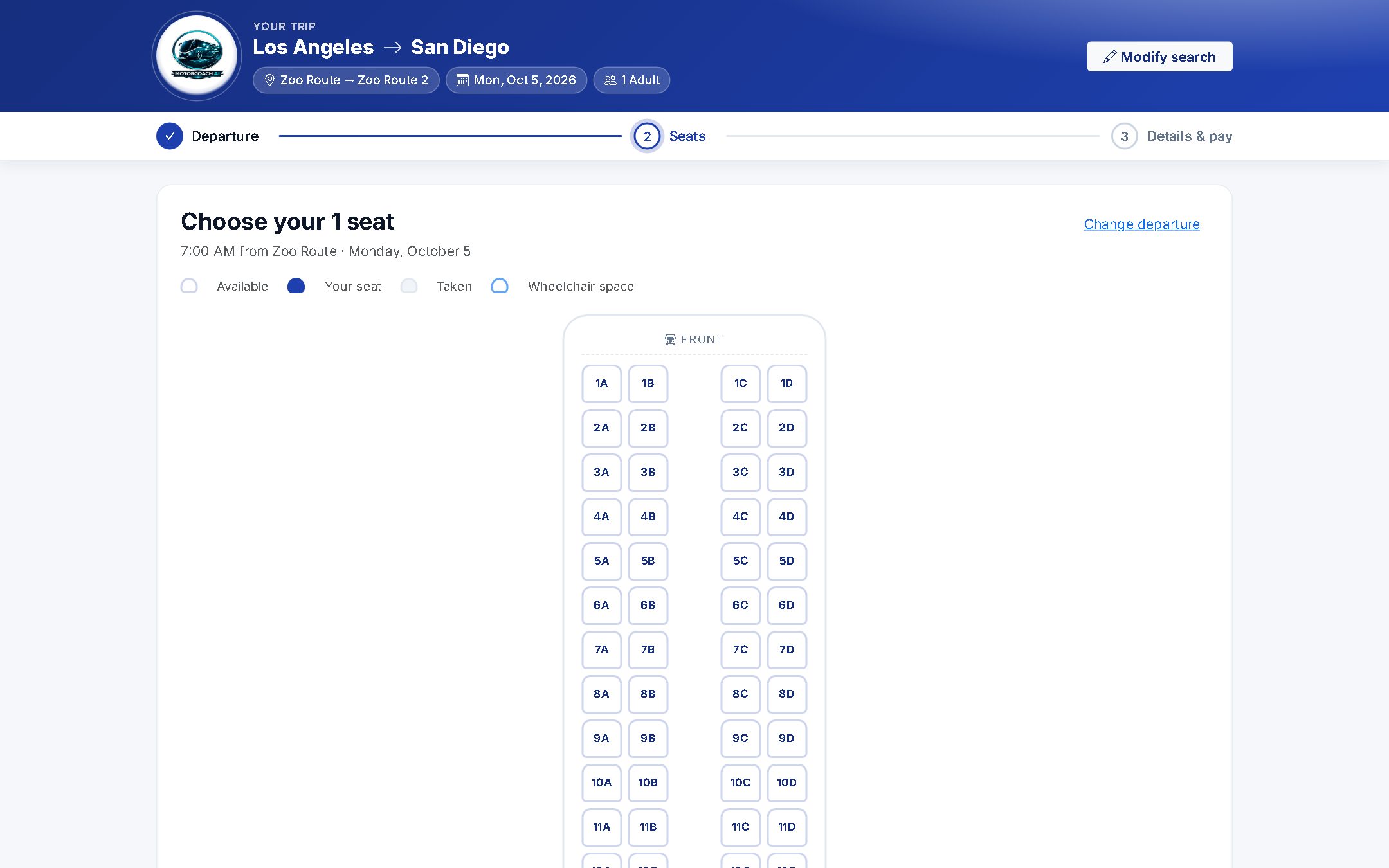
What riders see: the same map at checkout.
Set up stops, fares and seat maps once. MotorCoach.ai keeps the departures coming.
Type a place name and the full address and map pin fill in. Each stop has "where to wait" instructions, which are printed on every ticket.
List the stops in order and set each one to boarding, drop-off or both. Give each route a color.
Press one button to fill in stop times from Google driving times. Add dwell time at each stop and a buffer, and times are rounded to the nearest five minutes.
Create the return route in one click. It reverses the stops, mirrors the times and copies the fares, so you're ready to schedule.
Set Adult, Child, Senior and Student fares, or add your own rider types, priced route by route. If a fare needs proof, the driver is prompted to check ID.
Start from a 56-seat coach, a 55-seat coach with a wheelchair bay, a 32-seat minibus or a 15-seat van template. Then mark wheelchair and staff seats.
Set departure times, the days of the week, a date range, the coach layout, and a default vehicle and driver. Departures are created automatically, out to the end of your sales window. A route that can't be booked yet, such as one with no schedule, shows a clear warning.
Take holidays and days off out of sale for all routes or just one. Days that already have tickets sold are left for your office to decide.
Change a departure's time, swap the coach or driver, add an extra run, or cancel and reinstate. Your one-off changes survive later schedule edits.
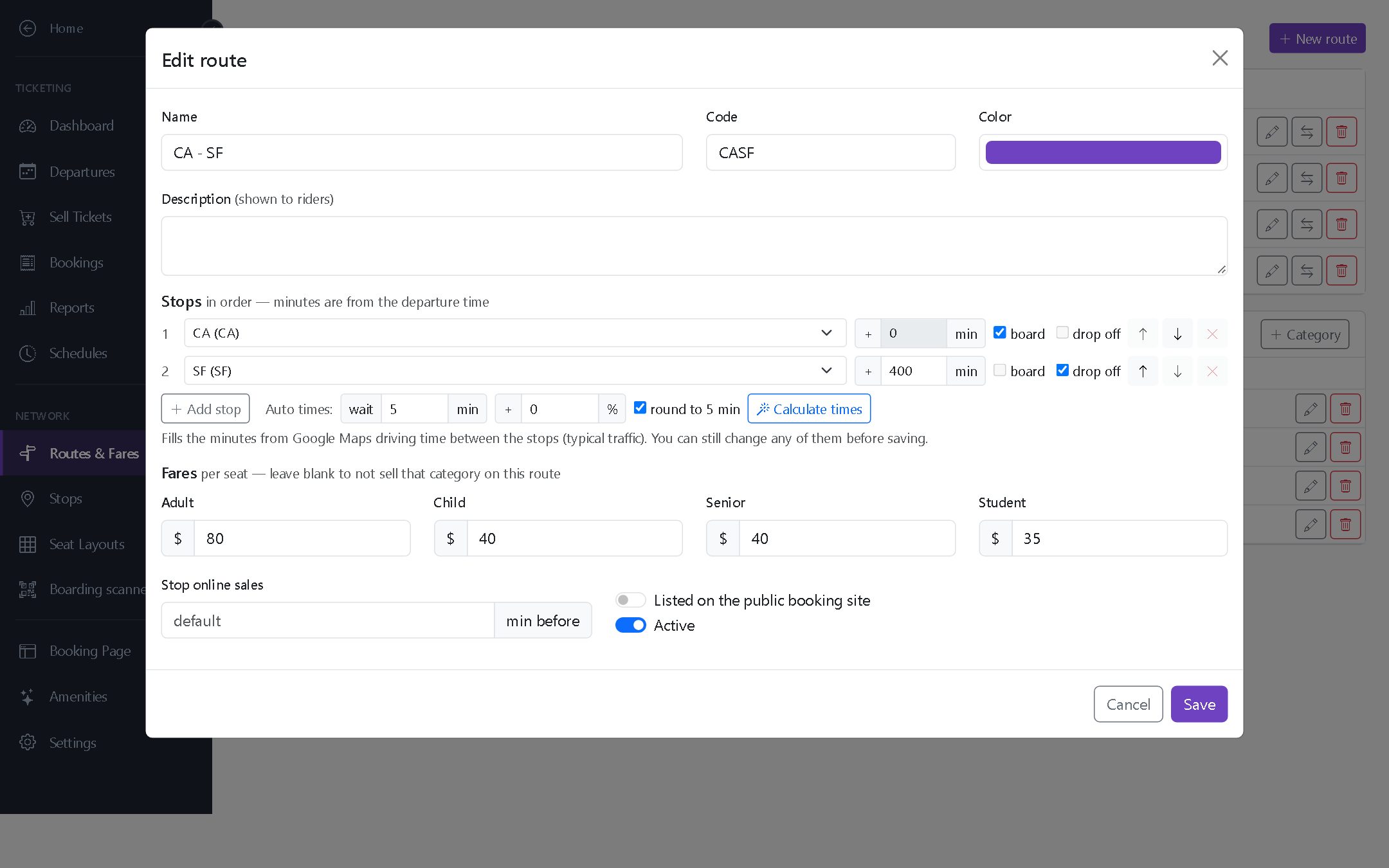
The route editor: stops in order, travel times from Calculate times, and fares for Adult, Child, Senior and Student.
Not every rider books online. With the Sell Tickets screen, your office staff use the same seat inventory and fares as your website, and their sales show up in the same reports.
The Departures screen lists each run by day with its seats sold, coach and driver. Cancelled departures stay on the list and can be reinstated.
Take cash and the change due is worked out for you. Take a card, or record another payment method with a reference.
Search departures on availability calendars and let seats be picked automatically. Sell one-way or round trip in a few clicks.
Staff can sell until the coach leaves, including on private or closed departures and for groups larger than the online limit.
See takings by payment method and sales channel, with a cash drawer report for each seller, so the end-of-day count balances.
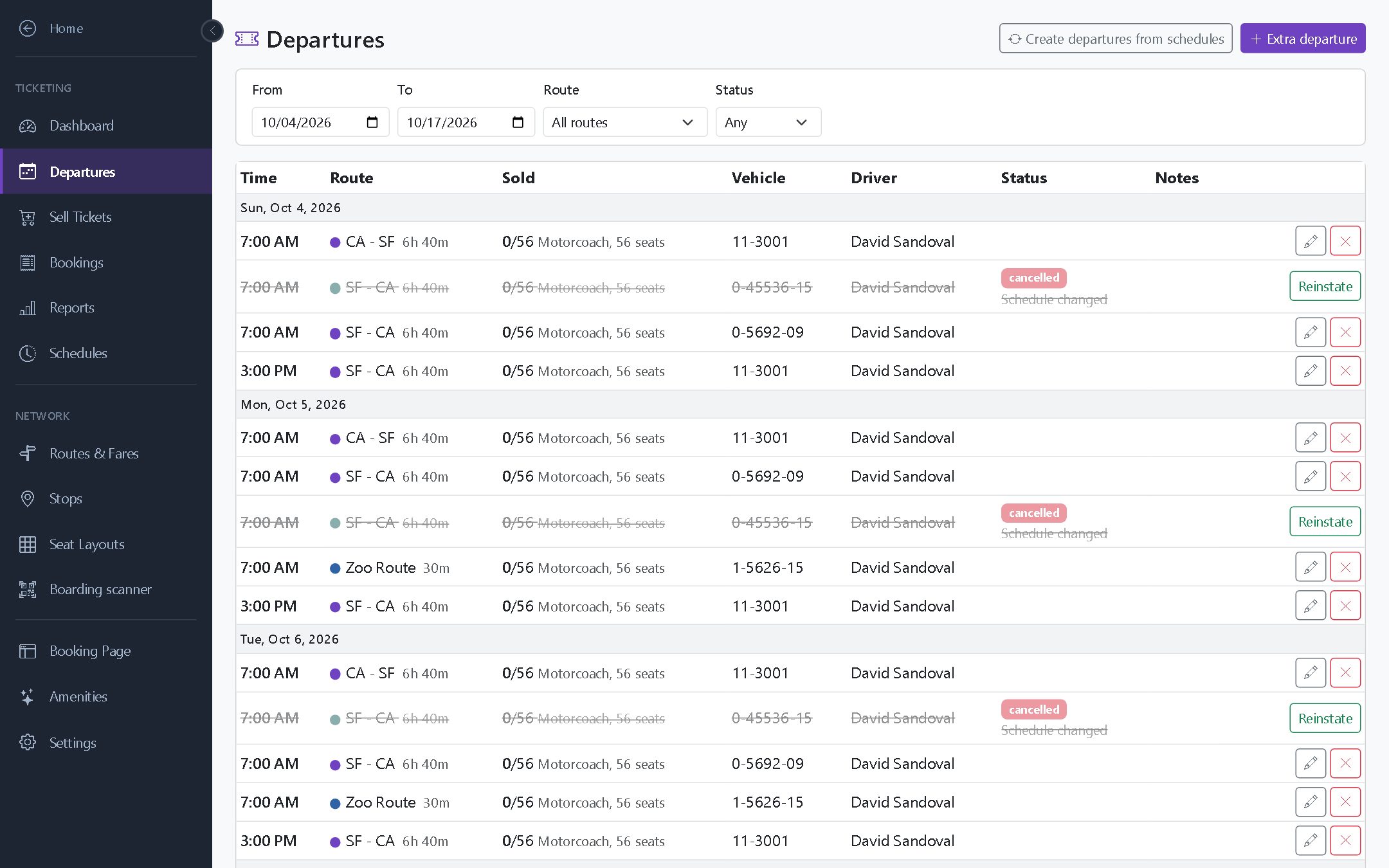
Departures: seats sold, coach and driver for every run.
You don't need scanners or ticket printers. Drivers open their departure in the driver portal and use their phone's camera. Every QR code is cryptographically signed, so tickets are checked in an instant, even with no signal.
Green means board. Amber means check ID for a fare that needs proof. Red means the ticket was already used, is for another departure, was cancelled or is fake. Each scan beeps and vibrates.
Scanning keeps going in dead zones. Scans are saved on the phone and synced once it is back online, with the real boarding time.
Drivers see only their own departures. Boarding staff can scan for any of them.
Drivers see who should board at each stop. They can board a rider without scanning if needed, and undo a mistake.
Each departure's manifest shows who has boarded in real time and can be printed for your records.
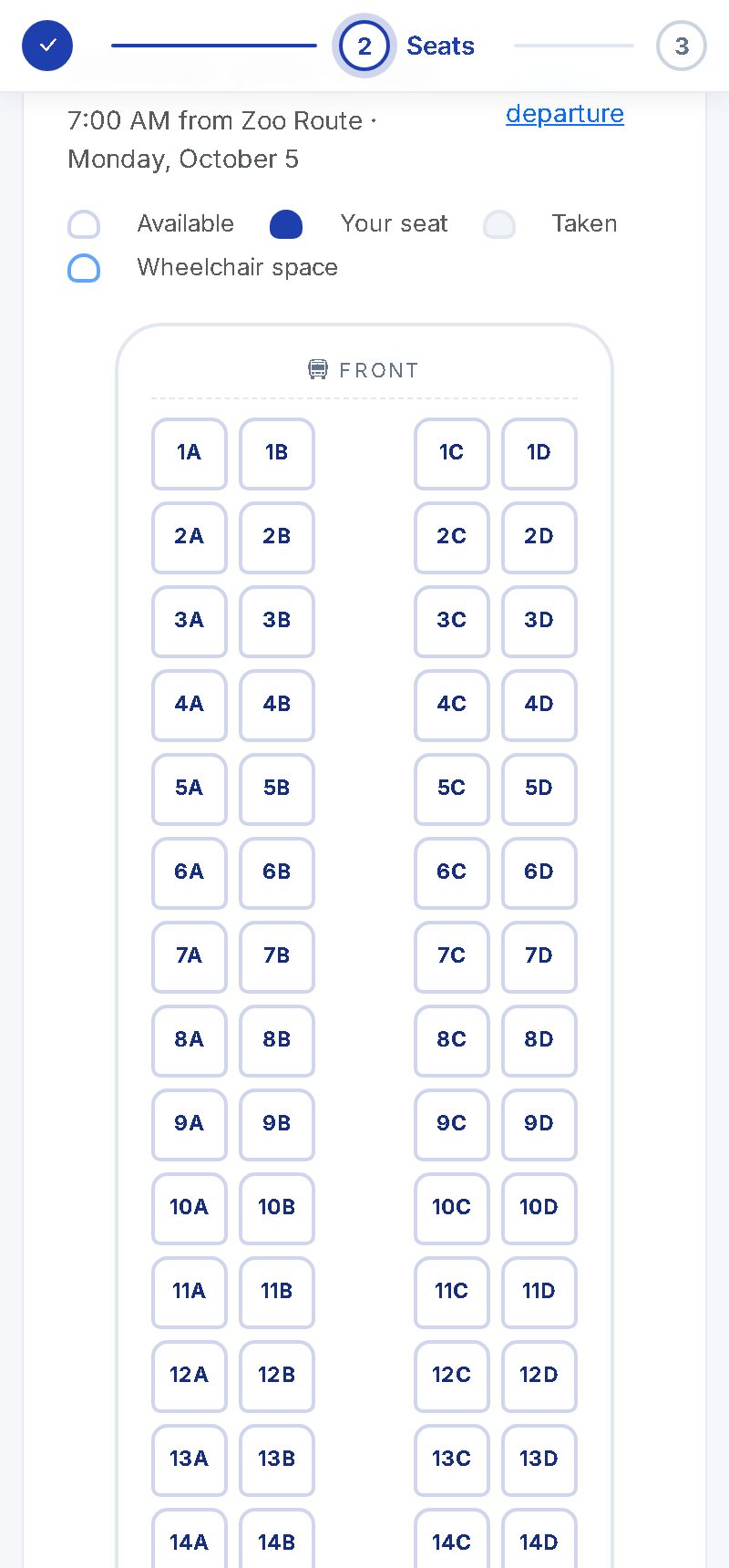
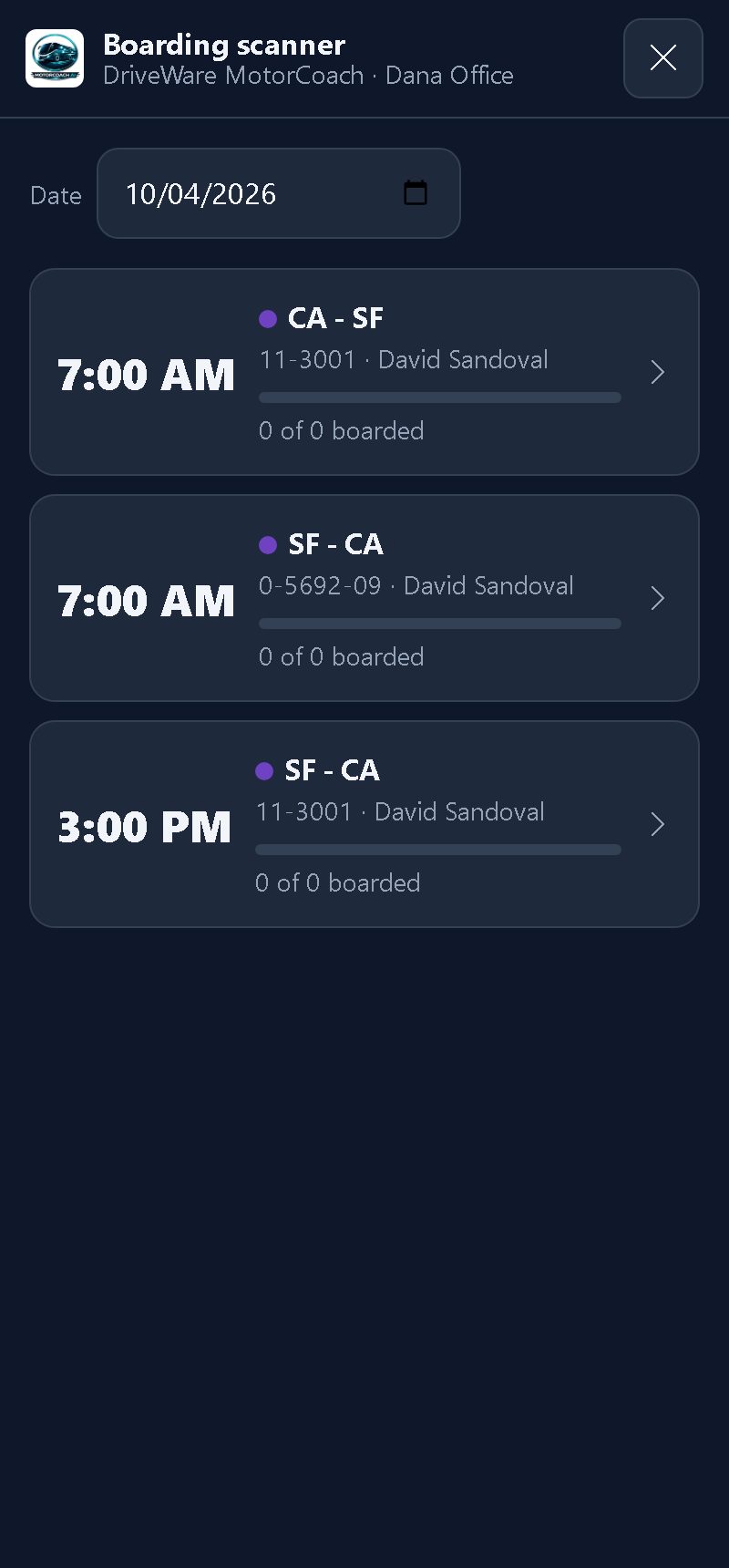
Riders pick seats on their phone. Drivers board them with theirs.
You set the rules. MotorCoach.ai applies them, handles the money and tells your riders.
You decide whether riders can cancel or change online. Set the cut-off hours, the refund percentage, a change fee, and whether the card fee is refunded.
Riders or your office can move a booking to another departure, and the fare difference is handled for you. The old QR codes stop working, and every change is recorded.
Cancel a run and every card payment is refunded automatically. Every rider gets an email with your reason. Cash sales are marked as refunded so your office can pay them back.
If a departure's time changes, each rider is emailed their new pickup time at their own stop.
Payments that haven't settled are voided, and settled ones are refunded. Partial refunds are queued and retried until they go through. Each booking keeps a full refund history.
Send two reminders per journey, by default 24 hours and 2 hours before departure. Each includes the pickup time at the rider's own stop and their QR code.
Get paid safely online and see exactly where every dollar came from.
Payments go through your own Authorize.Net account, and card numbers are never stored by MotorCoach.ai. Riders get an on-screen receipt they can print.
If surcharging is allowed where you operate, you can pass on card fees of up to 4%. Riders see the fee clearly before they pay.
Rate limits stop card-testing attacks, uncertain payments are voided automatically, and an hourly cleanup job keeps your seats and your money in step.
Six reports built on the same numbers, so they always agree: sales summary, transactions, departures, refunds, earned revenue and deferred revenue. The departures report shows how full each run was.
Transactions with gateway IDs, refunds, and earned vs. deferred revenue reports for tickets sold ahead of travel. Export to CSV or print.
14 separate ticketing permissions, such as selling, cancelling and refunding, viewing reports and scanning, so each person only gets the access their job needs.
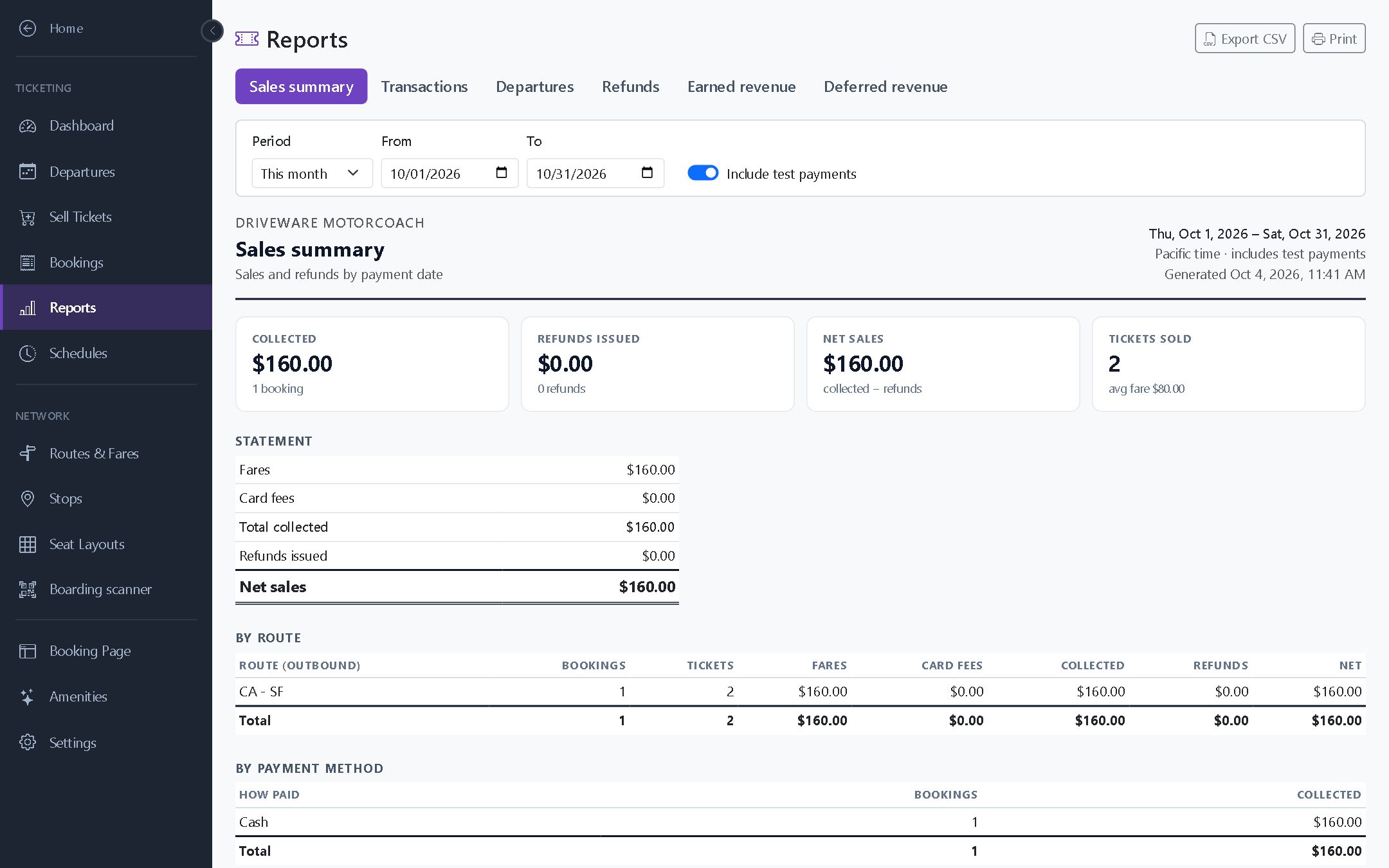
The sales summary report, with totals by route and by payment method.
What changes when every seat is sold and boarded in one system.
| Capability | Phone, Paper & Spreadsheets | MotorCoach.ai Bus Ticketing |
|---|---|---|
| Booking | Only during office hours, by phone | A branded booking page open 24/7, plus office sales |
| Seat Assignment | Penciled in, risk of double-selling | Riders pick a real seat, never sold twice |
| Ticket Delivery | Printed, mailed, or held at will-call | A QR ticket for each rider, emailed instantly |
| Boarding | Driver ticks names off a paper list | Phone scan, green/amber/red, works offline |
| Duplicate & Fake Tickets | Hard to spot | Signed codes, flagged when already used or fake |
| Schedule Changes | Call every passenger | Riders emailed automatically, with refunds when a run is cancelled |
| Reporting | Manual tallies after the trip | Sales, occupancy, refunds and deferred revenue, ready to export |
If you run a coach on a timetable and sell seats on it, Bus Ticketing is built for you.
Fixed-stop routes between cities, with boarding and drop-off at each stop, fares by rider type, and round trips.
Several departures a day on a regular timetable, with travelers booking seats ahead and boarding by scan.
Recurring weekly departures with senior fares, a mix of walk-up and phone sales, and cash drawers that balance.
Concerts, stadiums and festivals. Sell out a coach online, add extra departures when demand spikes, and scan everyone on.
Seasonal sightseeing and day tours, using blackout dates and a sales window you control.
Weekday schedules, with student and senior fares and reminder emails that keep regular riders on time.
Bus Ticketing runs in the same MotorCoach.ai account you use for charters. You don't need a second system or a second login, and nothing has to be entered twice.
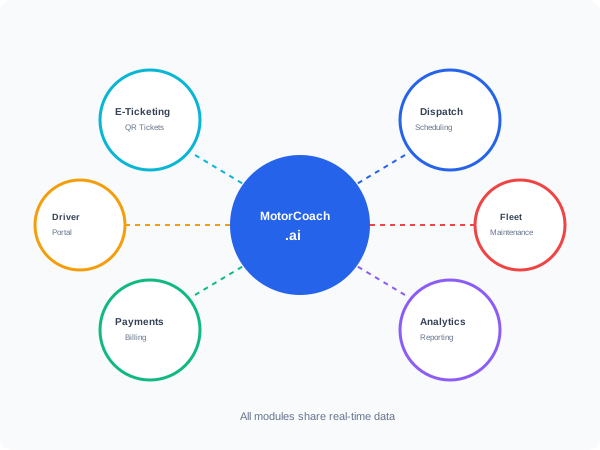
Show us a route and we'll show you what it looks like on MotorCoach.ai Bus Ticketing. We'll set it up together.
 MotorCoach